Important Update: Changes to European Union (EU) Customs Regulations Effective June 27, 2026, a flat rate customs duty of RM 16 per line item for parcel values of €150 and below will be collected from the shipper. This applies to parcels destined to any of the 27 EU member states: Austria, Belgium, Bulgaria, Croatia, Cyprus, Czech Republic, Denmark, Estonia, Finland, France, Germany, Greece, Hungary, Ireland, Italy, Latvia, Lithuania, Luxembourg, Malta, Netherlands, Poland, Portugal, Romania, Slovakia, Slovenia, Spain, and Sweden.
Updates on Shipping to the United States US import tariffs are revised from 19% to 10% for Economy and Standard shipping (DDP).
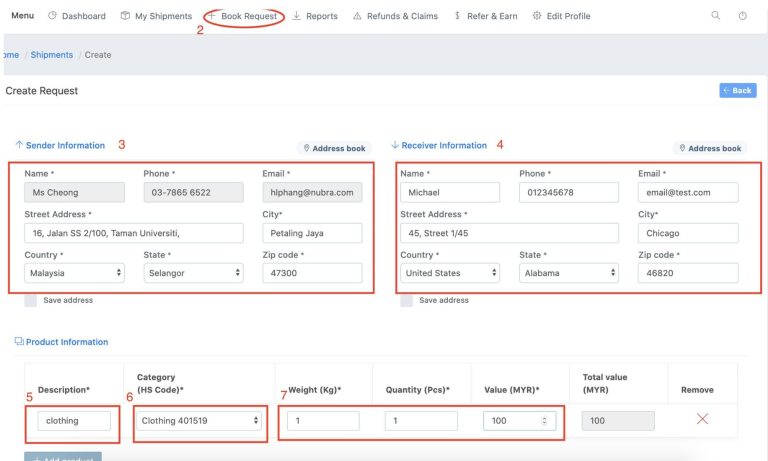
Please do not write “gift” or “present”. It has to be a description of the actual item.
6. HS Code
(for declaration purposes)
If you’re not sure, select “Others”. We will input the right one for you.
7. Weight, Quantity and Value
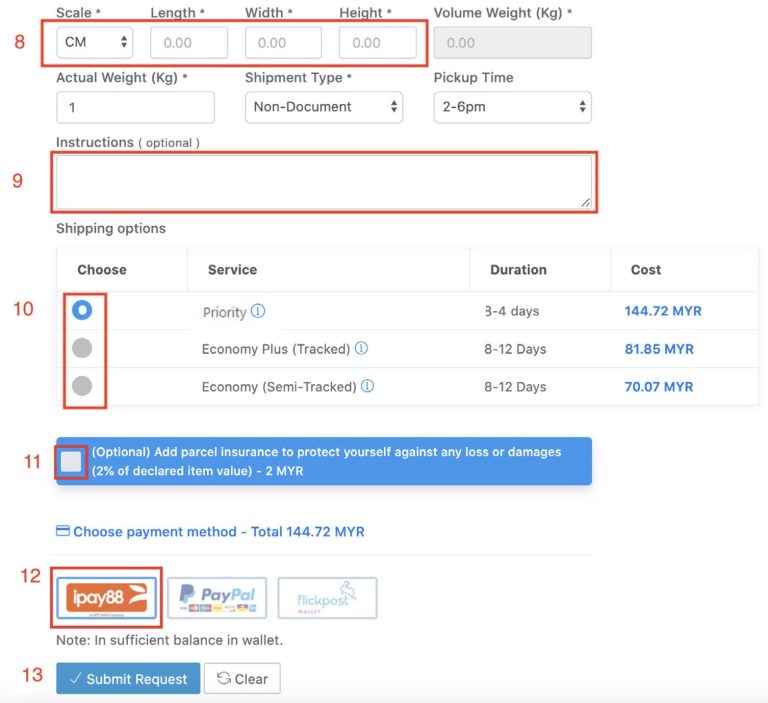
8. Parcel dimensions
9. Any comments (optional)
10. Select your preferred Shipping Option
11. Parcel insurance (optional)
12. Payment method
For internet banking, debit/credit cards, GrabPay, Boost, Touch ‘n Go eWallet etc., please select payment option 1
13. Click “Submit Request”.
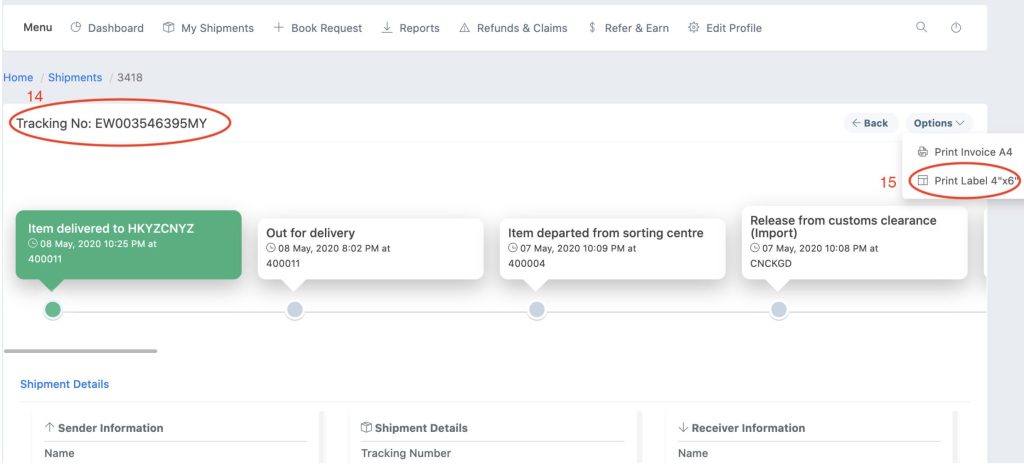
14. Tracking Number
A tracking number will be automatically assigned after payment is made.
15. Print Label
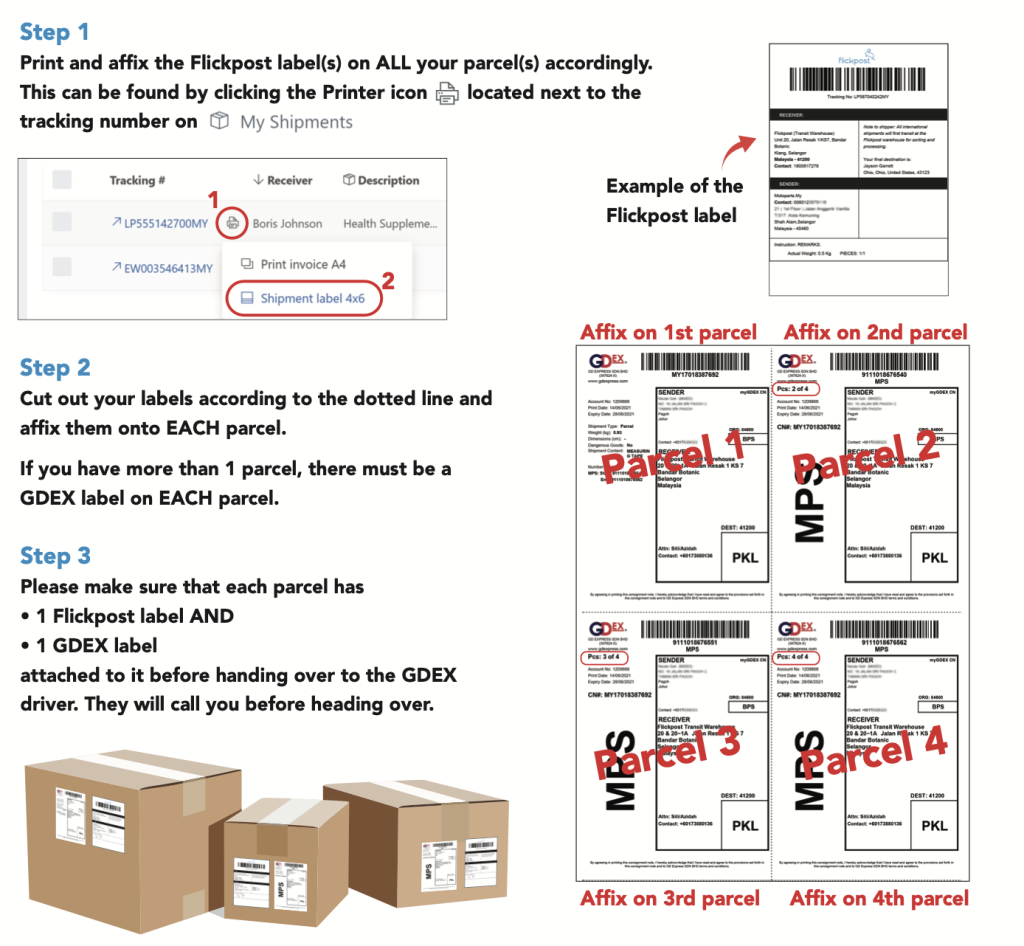
Please make sure that each parcel has • 1 Flickpost label (from Flickpost booking system) AND • 1 GDEX label (For bookings placed before 12pm, Gdex pick label will emailed to you same day by 12pm.)
attached to it before handing over to the GDEX driver. They will call you before heading over.
So you’ve placed a booking online, what’s next?
To ensure that all your parcels arrive at our hub safely, we would suggest the following steps:
Please make sure that each parcel has • 1 Flickpost label (from Flickpost system) AND • 1 GDEX label (Emailed to you) attached to it before handing over to the GDEX driver. They will call you before heading over.
For bookings placed before 12pm, Gdex pick label will emailed to you same day by 12pm.
Please do not write “gift” or “present”. It has to be a description of the actual item.
6. HS Code
(for declaration purposes)
If you’re not sure, select “Others”. We will input the right one for you.
7. Weight, Quantity and Value
8. Parcel dimensions
9. Any comments (optional)
10. Select your preferred Shipping Option
11. Parcel insurance (optional)
12. Payment method
For internet banking, debit/credit cards, GrabPay, Boost, Touch ‘n Go eWallet etc., please select payment option 1
13. Click “Submit Request”.
14. Tracking Number
A tracking number will be automatically assigned after payment is made.
15. Print Label
Please make sure that each parcel has • 1 Flickpost label (from Flickpost booking system) AND • 1 GDEX label (For bookings placed before 12pm, Gdex pick label will emailed to you same day by 12pm.)
attached to it before handing over to the GDEX driver. They will call you before heading over.
So you’ve placed a booking online, what’s next?
To ensure that all your parcels arrive at our hub safely, we would suggest the following steps:
Please make sure that each parcel has • 1 Flickpost label (from Flickpost system) AND • 1 GDEX label (Emailed to you) attached to it before handing over to the GDEX driver. They will call you before heading over.
For bookings placed before 12pm, Gdex pick label will emailed to you same day by 12pm.